Arlo Essential Camera 2nd Gen Review: Should You Buy This?
Want a smart camera that watches your home day and night? The Arlo Essential Camera 2nd Gen might be your answer. This camera brings sharp video and smart features to your doorstep.
This camera captures 2K resolution video with stunning clarity. Its 4MP sensor and 130° field of view give you a clear picture of your surroundings.
Two way audio lets you talk to visitors or scare off unwanted guests. AI notifications alert you to important events right away.
But is this camera right for you? It has some quirks, like battery drain concerns and a subscription requirement for cloud storage.
This review breaks down everything you need to know. We will cover the good, the bad, and how this camera stacks up against other Arlo models like the Pro 4 and Ultra 2.
Let’s find out if this camera earns a spot on your wall.
In a Nutshell
Here’s the quick rundown on what this camera brings to your doorstep:
- 4MP sensor powers the 2K video, giving you sharp detail even when you zoom in later.
- The 130° diagonal field of view covers a good area, but some users find it narrow compared to competitors like the Arlo Pro 4.
- AI notifications help you spot real threats. The camera learns to tell people apart from pets or passing cars.
- App integration works smoothly with Alexa and Google Assistant. You can check feeds or give voice commands with ease.
- Keep in mind this camera does not connect to Arlo hubs or base stations. It relies fully on Wi-Fi and cloud storage.
- Battery life ranges from 4 to 6 months under normal use. Some owners report faster drain, so keep an eye on your stats.
- If you want more coverage or higher resolution, check out the Arlo Ultra 2 or the budget friendly Arlo Essential 1080p.
This camera fits homes that want smart alerts and clear video without extra hub hardware.
Video Quality and Resolution
The 2K resolution on this camera delivers sharp, detailed footage you can actually use. A 4MP sensor captures fine details like facial features and license plates, even when you zoom into recordings later. This clarity matters when you need to identify who visited your property.
The 130 degree diagonal field of view covers most entry points effectively. However, some users find this narrower than what they need for wider areas. If you want panoramic coverage, you might feel limited here.
Color night vision sets this camera apart from basic models. Instead of grainy black and white footage, you see actual colors even in low light. The integrated spotlight brightens dark areas automatically, making nighttime video even clearer. This combination means you won’t miss important details after sunset.
Daytime video quality shines in good lighting conditions. Colors look natural, and movement appears smooth without lag. The camera handles bright sunlight without washing out details. You get usable footage across most lighting situations.
The app displays video in high quality on your phone or tablet. Playback is smooth, and you can scrub through recordings easily. Smart home integration with Alexa and Google Assistant works without hiccups. You can view live feeds or clips through voice commands.
One important note: this camera does not connect to Arlo hubs or base stations. It operates independently, which means no local storage backup. You’ll need the Arlo subscription to save and review footage. This is different from other Arlo models that offer hub connectivity.
Battery life ranges from 4 to 6 months under normal use. However, some users report faster drain in cold weather or with heavy spotlight use. Frequent motion alerts and night vision recording can reduce battery longevity faster than expected.
Overall, the video quality justifies the 2K investment for most homeowners. You get reliable clarity during day and night. The lack of hub compatibility and subscription requirement are tradeoffs worth considering before purchase.

- Reliable 2K Protection for Everyday Monitoring: This rechargeable wireless outdoor security camera...
- Arlo Secure Early Warning System Unlocks Advanced Features: Get 60-Day Video History, Intelligent...

Last update on 2026-10-26 / Affiliate links / Images from Amazon Product Advertising API
Design, Build, and Installation
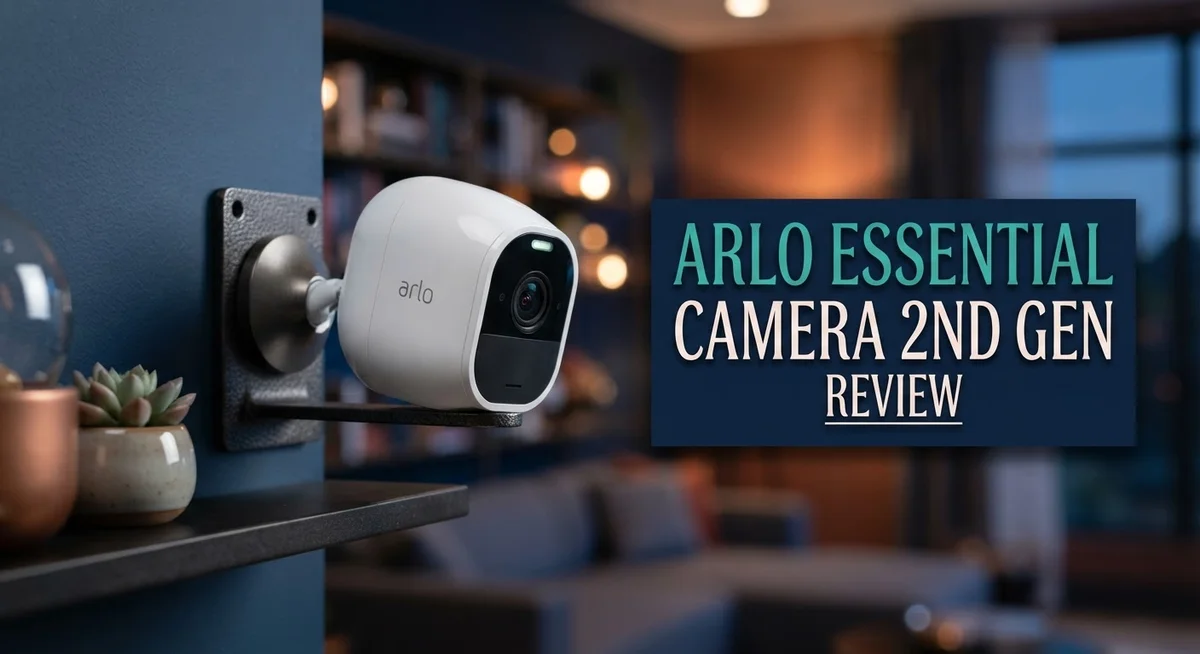
The Arlo Essential Camera 2nd Gen features a compact, modern design that blends into most home exteriors. The camera body measures roughly 3 inches tall and uses a white finish that matches most trim colors. The lens sits prominently at the front, protected by a durable plastic housing that resists weather damage.
The build quality feels solid without being heavy. You get a weatherproof casing rated for outdoor use in rain, snow, and intense sun. The mounting bracket is adjustable, letting you angle the camera up, down, or sideways. This flexibility helps you capture the exact area you want to monitor.
Installation takes just a few minutes. The camera mounts to walls, eaves, or door frames using the included bracket and screws. You don’t need any special tools or electrical work. Once mounted, you download the Arlo app, scan a QR code on the camera, and connect it to your WiFi network. The app walks you through each step with clear instructions.
Battery installation is straightforward. The camera uses four AA batteries housed in a compartment on the back. You simply slide the cover off, insert the batteries, and snap it shut. The battery door seals tightly to keep moisture out.
One design choice worth noting: this camera does not connect to Arlo hub or base stations. It communicates directly with your WiFi network and the cloud. This means you get a standalone system without extra hardware cluttering your setup.
The integrated spotlight sits above the lens and activates during night recording. This light helps the camera capture clearer color footage when darkness falls. The spotlight brightness is noticeable but not blinding to passersby.
The two-way audio uses a small speaker and microphone built into the front panel. Sound quality is decent for short conversations, though you won’t mistake it for a phone call.
Overall, the design prioritizes simplicity and quick installation. You can have this camera up and running in under 10 minutes from unboxing.
Battery Life and Power Management
The Arlo Essential Camera 2nd Gen runs on four AA batteries tucked into a compartment on the back. This design keeps installation simple and lets you swap power sources without tools or technical knowledge.
Under normal use, you can expect 4 to 6 months of battery life before needing replacements. This timeframe assumes regular motion detection and recording activity. However, real world results vary based on your specific setup.
Several factors drain the battery faster. Frequent motion events mean more recording sessions. Cold weather reduces battery efficiency. Heavy use of the integrated spotlight during night mode also pulls more power. If your camera sits in an active area with constant motion, you might see battery depletion sooner than the standard estimate.
Some users report battery drain issues that drop the camera dead in under two days. This suggests a potential defect rather than normal operation. If you experience this problem, contact Arlo support for a replacement unit. Most cameras perform within the advertised range.
The integrated spotlight is a power hungry feature. Activating it every night will noticeably reduce battery lifespan. You can disable the spotlight in the app settings to extend runtime if needed. This trade off lets you choose between longer battery life and automatic night illumination.
No wired power option exists for this camera model. You cannot plug it in for continuous operation. The battery only approach means you must commit to regular replacements or plan around battery swap schedules.
The app displays your remaining battery percentage clearly. Check this reading weekly to avoid unexpected shutdowns. Set a phone reminder when battery drops below 20 percent. This habit prevents gaps in your security coverage.
Compared to wired cameras, the battery powered design offers flexibility and easy installation. You place it anywhere without running cables. The trade off is managing battery maintenance as an ongoing task. For most homeowners, the convenience outweighs the battery management responsibility.
Top 3 Alternatives
Wyze Cam v3

- Motion & Sound Detection: Wyze Cam sends an alert to your phone when baby is crying. 24/7 Continuous...
- Indoor/Outdoor: Wyze Cam v3 is a wired video camera with an IP65 rating so you can confidently...
Last update on 2026-10-26 / Affiliate links / Images from Amazon Product Advertising API
The Wyze Cam v3 offers clear night vision with infrared technology. You get a 1080p resolution that captures sharp details in your home. The camera works both indoors and outdoors, making it versatile for different rooms. Two-way audio lets you speak through the device from anywhere. Person detection alerts notify you when motion happens. The setup process takes just minutes. Cloud storage options keep your footage safe.
Ring Indoor Cam

- Get the whole picture – Watch over your home day or night in 1080p HD video with Live View and...
- Video previews – Record a few extra seconds before every motion event with Advanced Pre-Roll to...
Last update on 2026-10-26 / Affiliate links / Images from Amazon Product Advertising API
Ring’s indoor camera connects easily to your Wi-Fi network. You receive instant notifications when the camera detects motion or sound. The 1080p video quality shows clear footage of your space. Two-way talk lets you communicate with people in your home remotely. Night vision works automatically when lights dim. You can view live feeds from your phone anytime. The compact design fits on shelves or desks without taking up much space.
Eufy Security Indoor Cam

- 𝐑𝐞𝐥𝐞𝐯𝐚𝐧𝐭 𝐑𝐞𝐜𝐨𝐫𝐝𝐢𝐧𝐠𝐬 | The on-device AI...
- 𝐓𝐡𝐞 𝐊𝐞𝐲 𝐢𝐬 𝐢𝐧 𝐭𝐡𝐞 𝐃𝐞𝐭𝐚𝐢𝐥 | View every event...
Last update on 2026-10-26 / Affiliate links / Images from Amazon Product Advertising API
Eufy’s indoor camera stores footage locally on your device instead of relying only on cloud services. This means your privacy stays protected without constant internet uploads. The 2K resolution provides crisp, detailed video. Person and pet detection features reduce false alerts from random movement. Two-way audio works smoothly for communication. Night vision captures clear images in darkness. The camera connects quickly to your home network. You control everything through the mobile app with simple, intuitive controls.
Smart Home Integration and App Experience
The Arlo Essential Camera 2nd Gen connects smoothly with major smart home platforms. Alexa and Google Home integration work right out of the box. You can view your camera feed on Echo devices or Google displays without extra setup steps.
The mobile app is where this camera shines for daily use. The interface feels clean and intuitive. You swipe through live view, recorded clips, and settings without confusion. The app sends AI powered notifications when motion or people appear on your camera. You can customize which alerts matter to you.
Two way audio lets you speak through the camera to visitors or delivery drivers. The speaker and microphone are built into the front panel. Sound quality is clear enough for quick conversations. Response time is fast, so interactions feel natural.
Smart automation features add real convenience. You can set the camera to arm or disarm based on your location. The app tells you exactly when motion happens and shows a thumbnail. Clip sharing is simple if you need to send footage to someone else.
One limitation stands out: this camera requires a subscription for cloud storage. You cannot save video locally without an Arlo hub or base station. The subscription model means ongoing costs for full functionality. Many users find this frustrating compared to cameras with free local options.
The app runs smoothly on both iOS and Android phones. Streaming quality adjusts automatically based on your internet speed. You get reliable performance even on slower connections. The battery percentage displays clearly so you know when replacements are due.
Geofencing and scheduling features help automate your security routine. You can set different modes for home, away, or custom times. The app remembers your preferences and applies them consistently.
Overall, the app experience feels polished and responsive. Smart home integration works as expected with no compatibility surprises. The subscription requirement is the trade off for this cloud based approach. If you already use Alexa or Google services, this camera fits naturally into your ecosystem.
Night Vision and Spotlight Performance
The Arlo Essential Camera 2nd Gen delivers strong night vision performance that sets it apart from basic security cameras. The camera captures color footage even in low light conditions, which means you see more detail than traditional infrared-only systems. This feature helps you identify visitors, packages, and potential threats with greater clarity after dark.
The integrated spotlight activates automatically during night recording sessions. This bright light illuminates your porch or entryway, making it easier to see what’s happening outside. The spotlight also acts as a deterrent, as most intruders avoid well-lit areas. You control spotlight activation through the mobile app, giving you flexibility in when to use this feature.
One important consideration: the spotlight significantly impacts battery drain. Running the spotlight frequently will reduce your battery life from the standard 4 to 6 months down to just a few weeks. Users who rely heavily on night vision and spotlight features should plan for more frequent battery replacements.
The camera’s 4MP sensor works well for identifying faces and reading details like license plates or package labels. The 2K resolution option provides crisp footage that reveals important information during both day and night hours. The 130 degree field of view captures most of your entry area, though some users wish for a wider angle.
Night vision quality improves when you use the spotlight compared to relying solely on ambient light. The combination of the camera’s color night vision and the bright spotlight creates a comprehensive security solution for after dark monitoring.
Battery drain remains the biggest concern for heavy night vision users. Some owners report their cameras die in under two days when using night features constantly. This means you should consider your specific needs before purchasing. If you record frequently at night or use the spotlight daily, factor in more regular battery maintenance.
The app lets you adjust night vision settings and control the spotlight remotely, giving you real time management of your camera’s night performance.
Pros and Cons
Pros
- 2K video resolution delivers sharp, clear footage for identifying faces and details
- Installation takes minutes with no wiring or professional setup needed
- Works seamlessly with Alexa, Google Home, and other smart home platforms
- Integrated spotlight turns on automatically at night for better visibility
- Two way audio lets you communicate through the camera to visitors or delivery drivers
Cons
- Cloud storage requires a paid subscription; no local storage option without an Arlo hub
- 130° field of view feels narrow for covering large areas or corners
- Some users report severe battery drain that kills the camera in under two days despite the 4 6 month rating
- Not compatible with existing Arlo base stations or hubs, limiting system flexibility
Who Should Buy It
The Arlo Essential Camera 2nd Gen works best for homeowners who want clear 2K video without complex setup. If you value simplicity, this camera delivers fast installation and straightforward operation.
You should buy this camera if you already use Alexa or Google Home. The seamless integration means you can view footage and control settings through your existing smart home ecosystem without extra steps.
Renters love this option because there’s no wiring or drilling required. You mount it anywhere, and you’re done. The wireless design gives you complete flexibility to move or remove it when you leave.
This camera suits people who prioritize daytime security. The 2K resolution captures clear details during daylight hours, making it ideal for identifying visitors, packages, or suspicious activity around your property.
You’re a good fit if you don’t mind paying for cloud storage. The camera requires a subscription for video recording and playback. If you prefer local storage without ongoing fees, you’ll need an Arlo hub instead.
Consider this model if you want night vision with automatic lighting. The integrated spotlight activates when motion is detected at night, giving you visibility without manually turning anything on.
Skip this camera if you need wide area coverage. The 130 degree field of view is narrower than some competitors, so it works better for focused areas like doorways rather than large open spaces.
Battery life matters here. The 4 to 6 month rating applies to normal use, but heavy night vision activity drains batteries faster. Some users report significant battery drain, so this isn’t ideal if you expect year round operation without frequent charging.
You should avoid this if you want hub compatibility. Unlike other Arlo models, the Essential 2nd Gen doesn’t work with Arlo base stations or hubs, so you’re locked into cloud storage only.
This camera fits your needs if you want a reliable, easy to use system with strong app performance. The responsive interface and smart automation features make daily monitoring simple and convenient.
Final Verdict
The Arlo Essential Camera 2nd Gen stands out as a smart pick for everyday home monitoring. Its clear video and simple setup make it a solid choice for many households.
This camera shines brightest for people who already trust smart home systems. If your home runs on Alexa or Google Home, this device fits right in.
However, it does have some rough edges. The battery performance can feel unpredictable, and that’s a real factor to weigh before you decide.
Think about your specific needs first. Do you need broad coverage across a large yard? Then this might not be your best match.
But if you want clear footage of your front door or a single entry point, this camera performs well. Face recognition and package details show up clearly in daylight and night footage alike.
The subscription requirement is another point to consider. Without a hub, you depend on cloud storage for saving footage.
Some buyers may find this frustrating. Others won’t mind, especially if they already use other Arlo products with cloud plans.
Compare this model against alternatives like the Arlo Pro 4 or Arlo Ultra 2. Those options offer wider coverage or higher resolution, though they come with their own tradeoffs too.
The Arlo Essential 1080p remains a simpler alternative for those who want basic monitoring without extra features.
Overall, this camera works best for renters and homeowners who want quick installation and dependable daytime performance. It handles typical home security tasks without fuss.
The battery concerns and narrow field of view are the main drawbacks to remember. If these don’t bother you, the camera delivers solid value in other areas.
For most casual users, the Arlo Essential Camera 2nd Gen offers a dependable security solution. It won’t satisfy everyone, but it covers the basics well.
Weigh your priorities carefully. Decide if the pros outweigh the cons for your specific home setup. This will help you make the right call.
Frequently Asked Questions
Does the Arlo Essential Camera 2nd Gen work with my smart home system?
Yes, it does. This camera connects to Alexa and Google Home without trouble. You can view live footage, get alerts, and control the spotlight through your existing smart home setup.
The integration is smooth. Most users report quick setup with their preferred platform.
Why does my battery drain so fast?
The camera should last 4 to 6 months on a charge. However, some owners experience faster drain, with batteries dying in under two days.
This happens more often when the spotlight activates frequently or the camera detects constant motion. Check your notification settings and spotlight sensitivity to improve battery life.
Can I store video locally without a subscription?
No, you cannot. The camera requires a paid cloud storage subscription to save footage. Local storage is only available if you buy a separate Arlo hub.
This is a key difference from some competitors. Plan for an ongoing subscription cost if cloud backup matters to you.
Is the 130 degree field of view wide enough?
It covers a decent area for single entry points like front doors. For wider coverage of large spaces or multiple corners, you may find it limiting.
Consider your specific location. If you need to monitor a wide porch or driveway, a wider angle camera might suit you better.
What’s the difference between the 2nd Gen and the original Essential?
The 2nd Gen offers 2K video instead of 1080p. You get sharper daytime and nighttime footage. Both models share similar features like the integrated spotlight and two way audio.
The newer version delivers noticeably clearer images for identifying details like faces or license plates.

Hi, I’m Kate! As a tech journalist and gadget enthusiast, I’ve been exploring the intersection of artificial intelligence and consumer technology for over a decade. My passion lies in translating complex tech concepts into practical insights that actually matter to real people.