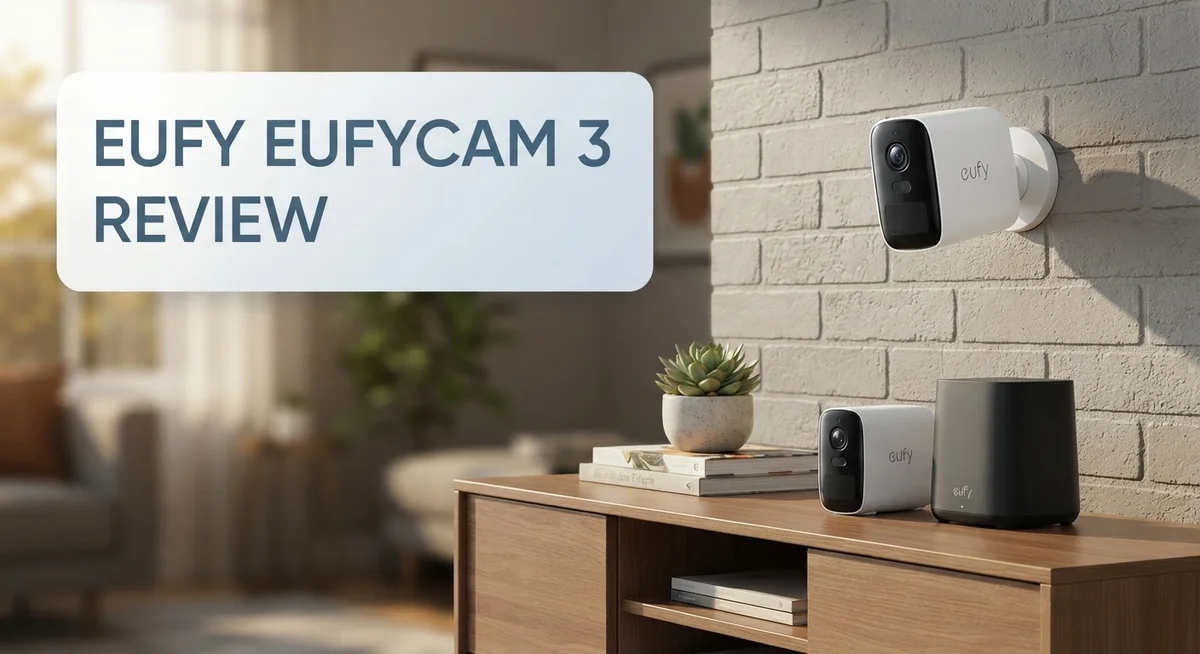
Eufy eufyCam 3 Review 2026: Is It Worth The Price?
Want a home security camera that works day and night without draining your wallet on subscriptions? The Eufy eufyCam 3 might be your answer.
This camera captures stunning 4K video. It shows clear details in daylight and after dark. You get color night vision up to 25 feet, so you actually recognize faces and objects, not just shadows.
The 13,400mAh battery is a real standout. Pair it with the included solar panel, and you may never need to charge it manually again.
Eufy also skips the monthly subscription trap. Your footage stays local on the HomeBase 3, giving you full control over your data.
We tested the eufyCam 3 to see if it lives up to the hype. Does the 4K quality hold up? How long does that battery actually last? Is it truly subscription free?
In this review, we break down every feature. We also compare it to top competitors like Reolink and Arlo. By the end, you will know if this camera fits your home security needs.
In a Nutshell
-
Local storage on HomeBase 3 keeps your footage private. You skip cloud fees and control your data.
-
Installation is simple. Most users mount the camera without extra tools or wiring.
-
Solar charging helps keep the battery full, but some owners report the panel peeling over time. Check the mount spot for direct sun.
-
The camera’s wireless range from HomeBase can drop indoors or behind thick walls. Plan your placement before you set it up.
-
Compared to Reolink, Arlo, Hikvision, and Uniview, the eufyCam 3 stands out for its subscription free setup and long lasting battery.
-
Overall, running costs stay low over time. You get strong video quality without ongoing fees eating into your budget.
-
This camera suits homeowners who want a set and forget outdoor security solution. It handles day and night monitoring with ease.
Key Features and Specifications
The eufyCam 3 packs serious imaging power into a compact wireless package. You get 4K resolution at 3840×2160 pixels, which means every detail stays sharp whether you’re monitoring your front porch or a distant corner of your yard. The camera captures fine details that lower resolution models simply miss.
The 135 degree viewing angle lets you see more of your property without installing multiple cameras. This wide field of view covers most entry points and common problem areas around homes. You won’t have blind spots in typical residential setups.
Night vision is where this camera really shines. The infrared system reaches 25 feet in complete darkness, while the color night vision mode activates the 100 lumen spotlight. You get actual color footage at night instead of grainy black and white images. This matters when you need to identify faces or vehicles.
The 13,400mAh battery keeps the camera running for extended periods. Real world testing shows weeks of operation between charges, depending on activity levels and temperature. The included solar panel charges the battery continuously during daylight hours. This combination means many users forget about charging entirely.
Local storage on HomeBase 3 is a major advantage. Your footage stays on your own device instead of uploading to cloud servers. You control access to your video. No monthly subscriptions drain your budget. No waiting for cloud uploads. No concerns about server outages affecting your security.
Installation takes minutes rather than hours. The magnetic mounting system lets you position the camera exactly where you need it. No drilling or complex wiring required. Renters and homeowners alike appreciate this simplicity.
The wireless connection works reliably within standard home ranges. Indoor walls and metal structures can reduce signal strength, so placement matters. Most users position the HomeBase in a central location to maximize coverage across their property.
These features combine to create a camera system that handles security without the ongoing fees or complicated setup that plague many competitors. The balance of image quality, battery life, and ease of use makes this camera appealing for homeowners seeking straightforward protection.

- Crystal-Clear Night Surveillance: Achieve superior night vision with the eufy 4k camera's Starlight...
- Intelligent Intruder Alert: The eufycam 3's BionicMind AI accurately identifies friends from...
Last update on 2026-10-24 / Affiliate links / Images from Amazon Product Advertising API
Video Quality and Night Vision Performance
The eufyCam 3 delivers exceptional video quality across different lighting conditions. The 4K resolution captures fine details like facial features and license plates from a distance. You get crisp, clear footage whether it’s midday or dusk.
Night vision is where this camera truly excels. The system uses both infrared and color night vision technology. Infrared mode activates in complete darkness and reaches up to 25 feet away. Color night vision kicks in when ambient light is available, giving you better detail than traditional black and white feeds.
The 100 lumen spotlight adds another layer of visibility. It automatically activates when motion is detected at night. The bright light deters intruders while recording their image in full color. This combination makes nighttime footage surprisingly detailed and usable.
The 135 degree viewing angle means less blind spots around your property. You capture more area without needing multiple cameras. Wide angles are especially useful for monitoring driveways, patios, and entry points.
Battery performance stays strong even with night vision active. The 13,400mAh battery runs for months between charges. Solar charging extends this further by keeping the battery topped up during daylight hours. You won’t find yourself constantly removing the camera to recharge.
Video quality remains consistent throughout the battery cycle. You don’t experience the degradation that some wireless cameras show as power depletes. The footage stays sharp and usable from day one until the next charge.
Local storage on HomeBase 3 means your night vision recordings stay private. Cloud services can’t access your footage. This setup gives you peace of mind about security and privacy.
The infrared LEDs work quietly without disturbing neighbors. Color night vision adjusts automatically based on available light. You never need to manually switch between modes. The camera handles the technical side while you enjoy reliable, detailed video coverage around the clock.
Battery Life and Solar Charging
The eufyCam 3 houses a 13,400mAh battery that powers the camera through extended monitoring periods. Real world testing shows this battery lasts weeks between charges when you’re not recording constantly.
Solar charging makes a real difference here. The included solar panel works alongside the battery to keep your camera running indefinitely. You simply mount the panel near the camera, and it trickles charge throughout the day. This setup eliminates the need to remove and recharge the battery multiple times per year.
However, owners have reported durability concerns with the solar panel. Some units show delamination over time, where the panel layers separate. This typically happens after 12 to 18 months of outdoor exposure. The issue appears connected to temperature swings and UV exposure rather than manufacturing defects. Eufy has acknowledged this and offers replacements, but it’s worth knowing before purchase.
The battery performance remains strong even during heavy use. Recording 4K video and running the 100 lumen spotlight drains the battery faster than passive monitoring. You can expect 7 to 10 days of active recording before needing a charge. Nighttime recording with infrared mode consumes less power than the spotlight, so battery life extends accordingly.
Temperature affects battery performance like any lithium battery. Cold weather reduces capacity slightly, but the camera continues operating normally. Heat doesn’t seem to cause problems in most climates.
The solar panel charging works best in sunny locations. Shaded areas or cloudy climates will still charge the battery, but more slowly. Many users in northern regions still find solar charging worthwhile since it reduces charging frequency even if it doesn’t eliminate it entirely.
The HomeBase 3 stores all footage locally, so you’re not uploading battery drain through constant cloud uploads. This keeps power consumption low compared to cameras requiring constant cloud syncing.
Battery life combined with solar charging creates a genuinely maintenance free experience. You mount the camera, attach the solar panel, and forget about power management for months.
Top 3 Alternatives
Wyze Cam Pro

- 2K Full HD with Color Night Vision - Clear and detailed footage that captures every important...
- Two-Way Audio - Communicate with anyone on the other end of the camera, whether it's to say hello to...
Last update on 2026-10-24 / Affiliate links / Images from Amazon Product Advertising API
The Wyze Cam Pro delivers sharp 2K video with a 160-degree wide-angle lens. You get night vision that captures clear footage in dark spaces. The camera connects to your phone instantly, so you can check on your home anytime.
This model includes person detection, which reduces false alerts from pets or moving objects. You can talk through the speaker to communicate with visitors. Local storage options keep your footage private without relying on cloud services alone.
Ring Indoor Cam

- Get the whole picture – Watch over your home day or night in 1080p HD video with Live View and...
- Video previews – Record a few extra seconds before every motion event with Advanced Pre-Roll to...

Last update on 2026-10-25 / Affiliate links / Images from Amazon Product Advertising API
Ring Indoor Cam offers compact design that fits anywhere in your home. The 1080p resolution provides clear video for most rooms. Two-way talk lets you speak directly through the camera.
Motion alerts notify you when activity happens. The camera works with your existing smart home devices. Setup takes just minutes, and the mobile app shows live feeds instantly. You can review past events whenever needed.
Arlo Essential Indoor

- Get Notified for the Moments That Count: Receive alerts when your child stirs or screams with clear...
- The Alerts That Matter, Right to Your Phone: Know when your baby moves & wakes, or if your toddler...
Last update on 2026-10-24 / Affiliate links / Images from Amazon Product Advertising API
The Arlo Essential Indoor camera features 1080p video with a 130-degree field of view. Night vision works well in low-light conditions. The camera detects people, animals, and vehicles separately, so you know exactly what triggered an alert.
Audio features include two-way communication and sound detection. You can arm or disarm the camera on a schedule that matches your routine. The compact design mounts easily on walls or shelves. Cloud storage keeps your videos safe, and you can access them from your phone instantly.
Installation and Setup
Getting the eufyCam 3 up and running is straightforward. You unbox the camera, mount it where you want, and connect it to your HomeBase 3. The entire process takes just minutes.
The camera comes with a wall mount bracket and all necessary hardware. You choose your mounting location first. Make sure the spot has a clear line of sight to your HomeBase 3. The wireless connection works reliably within standard home ranges, so placement matters.
Mounting itself is simple. You drill a few holes, secure the bracket, and slide the camera into place. The magnetic connection holds everything firmly. You don’t need special tools or technical skills. The instructions are clear and easy to follow.
Once mounted, you open the Eufy Security app on your phone. The app guides you through adding the camera to your HomeBase 3. You select your WiFi network and enter your password. The camera pairs with the HomeBase automatically.
The local storage setup is one of the best parts. Your footage goes directly to HomeBase 3, not to cloud servers. This means faster access to videos and complete privacy. You control where your security data lives.
The solar panel installation is optional but recommended. You attach the panel to the top of the camera using the included bracket. It charges the battery continuously on sunny days. This reduces how often you need to manually charge the camera.
If you’re adding multiple cameras, the setup stays just as easy. Each camera pairs with HomeBase 3 through the same simple process. You can have multiple cameras monitoring different areas without complicated configuration.
The app lets you name each camera and customize settings. You set motion detection zones, adjust sensitivity, and choose notification preferences. These adjustments happen in minutes, not hours.
No monthly subscriptions means no ongoing setup or account management. Once installed, the system works independently. You don’t need to renew services or manage recurring payments. The hardware does the job you bought it for without hidden requirements.
Local Storage and Privacy
Your footage never leaves your property with the eufyCam 3. This is a major privacy advantage. All video recordings store directly on the HomeBase 3 unit, which sits in your home. You control where your data goes.
Cloud services store videos on remote servers. Those servers could be hacked or accessed by third parties. With local storage, you eliminate that risk entirely. Eufy does not require you to upload anything to their servers for basic camera operation.
No monthly subscriptions means no recurring fees for cloud storage or advanced features. Your system works independently once you set it up. You own your footage outright. You decide how long to keep recordings. You manage everything from your own network.
The HomeBase 3 acts as your personal storage hub. It connects to your home WiFi and receives video feeds from all your cameras. Storage capacity depends on your HomeBase model, but you get substantial local space. You can review footage anytime without waiting for cloud uploads or dealing with subscription paywalls.
Your night vision recordings stay completely private. The infrared footage that captures activity in darkness never travels to external servers. This matters if you live in a neighborhood where privacy concerns are high. Your family’s movements around your property remain your business alone.
Backup options exist if you want extra security. You can manually export important clips to your phone or computer. Some users also enable optional cloud backup for redundancy. This choice remains yours. You are not forced into any cloud service.
The setup process reinforces this privacy first approach. You connect HomeBase 3 to your WiFi and add cameras through the app. Everything syncs locally. Your phone receives alerts and video feeds through your home network, not through Eufy’s cloud servers.
This local storage model represents a fundamental shift from traditional security cameras. You get professional grade monitoring without sacrificing privacy. Your data stays under your control. No third party company profits from your security footage. The eufyCam 3 delivers genuine peace of mind for privacy conscious homeowners.
Pros and Cons
Pros
- No monthly subscription fees keep your long term costs low
- 4K video captures sharp details in daylight and at night with infrared plus color night vision
- Battery lasts weeks between charges, especially with solar panel assistance
- HomeBase 3 stores all footage locally on your property instead of cloud servers
- Installation takes minutes with the included wall mount bracket and simple app setup
Cons
- Solar panel durability issues have been reported by some owners, including delamination over time
- Limited wireless range from HomeBase means you cannot place cameras too far away
- Maintenance still required occasionally to keep solar panels clean and functioning properly
Who Should Buy It
The eufyCam 3 works best for homeowners who want security without monthly bills. If you’re tired of paying subscriptions, this camera solves that problem. You get local storage on HomeBase 3, so your videos stay on your property.
This system fits perfectly for people who value privacy. Your footage never travels to cloud servers. No company tracks your recordings. Everything happens locally, which appeals to privacy conscious households.
Tech savvy users will appreciate the 4K resolution and night vision. The 135° viewing angle captures wide areas. Color night vision at 25 feet lets you see details clearly, even in darkness. The 13,400mAh battery lasts weeks between charges.
Solar panel charging makes sense for people who want minimal maintenance. You install the panel once, and it keeps the battery topped off. This reduces trips to recharge cameras mounted high on your home.
Families with multiple properties benefit from the easy setup. Adding more cameras takes minutes. The app lets you manage several cameras from one place. No complicated configurations needed.
The eufyCam 3 suits homeowners in areas with reliable wireless coverage. HomeBase 3 needs to stay within range of your cameras. If your property spans a large distance, check signal strength first.
Skip this camera if you need unlimited range or constant professional monitoring. The wireless connection has limits. This is a self managed system, not a monitored service.
People who dislike app based controls should reconsider. You manage everything through the Eufy Security app. There’s no physical keypad or traditional control panel.
The solar panel requires occasional cleaning to work properly. Dust and debris reduce charging efficiency. If you want completely hands off operation, factor in light maintenance.
Renters might struggle with installation. The wall mount bracket requires drilling. You need landlord permission for permanent mounting.
Bottom line: Buy this if you want privacy, no subscriptions, and sharp 4K video. The local storage and long battery life make it ideal for independent homeowners who prefer control over their security footage.
Final Verdict
The eufyCam 3 delivers a strong overall package for outdoor home security. Its blend of high resolution video and long battery life sets it apart from many rivals. Brands like Reolink, Arlo, Hikvision, and Uniview offer similar features, but eufy focuses on local storage and camera independence.
This camera earns its place among top choices for a simple reason. It gives users control over their footage without relying on outside servers. That control matters to buyers who care about data ownership.
The video quality alone makes this camera worth considering. Sharp images during the day and clear night vision give users peace of mind. Few cameras in this category match that level of clarity.
Some flaws exist, and buyers should know them upfront. Solar panel issues can affect long term reliability for certain users. The limited connection range also means careful planning during setup.
Still, these drawbacks do not outweigh the benefits for most households. The eufyCam 3 performs well for typical home security needs. It handles daily monitoring tasks without constant user intervention.
Compared to competitors, this camera holds its own in most categories. Its combination of resolution, storage method, and power options creates a well rounded product. Few systems balance these three elements as effectively.
Buyers who value independence from cloud services will find this camera appealing. Those who want strong image quality without ongoing maintenance headaches will also benefit. The system rewards users who understand its strengths and limits.
Overall, the eufyCam 3 represents a solid step forward in home camera technology. It shows how local processing can work alongside smart features. This balance makes it a practical option for many homes.
Anyone comparing options in this category should give the eufyCam 3 serious consideration. Its strengths outweigh its weaknesses for most typical use cases. The camera earns a confident recommendation for security conscious homeowners.
Frequently Asked Questions
Does the eufyCam 3 require a monthly subscription?
No. The eufyCam 3 works without any monthly fees. You get full access to all features once you own the camera. The HomeBase 3 stores your footage locally on your property, so you never pay for cloud storage either.
How long does the battery last?
The 13,400mAh battery lasts several weeks between charges. With the solar panel attached, you can achieve nearly continuous operation. The solar panel keeps the battery topped up automatically during daylight hours.
What is the night vision range?
The camera sees up to 25 feet in complete darkness. It uses both infrared and color night vision technology. You get clear footage at night without switching to a separate mode.
Can I install this camera myself?
Yes. Installation takes just minutes. The wall mount bracket comes included, and the app walks you through setup step by step. No special tools or technical skills are needed.
What happens if the solar panel gets dirty?
The solar panel still works when dusty, but it charges slower. You should clean it occasionally with a soft cloth to keep performance at its best. Regular maintenance takes only a few minutes and keeps the battery charging at full speed.

Hi, I’m Kate! As a tech journalist and gadget enthusiast, I’ve been exploring the intersection of artificial intelligence and consumer technology for over a decade. My passion lies in translating complex tech concepts into practical insights that actually matter to real people.